
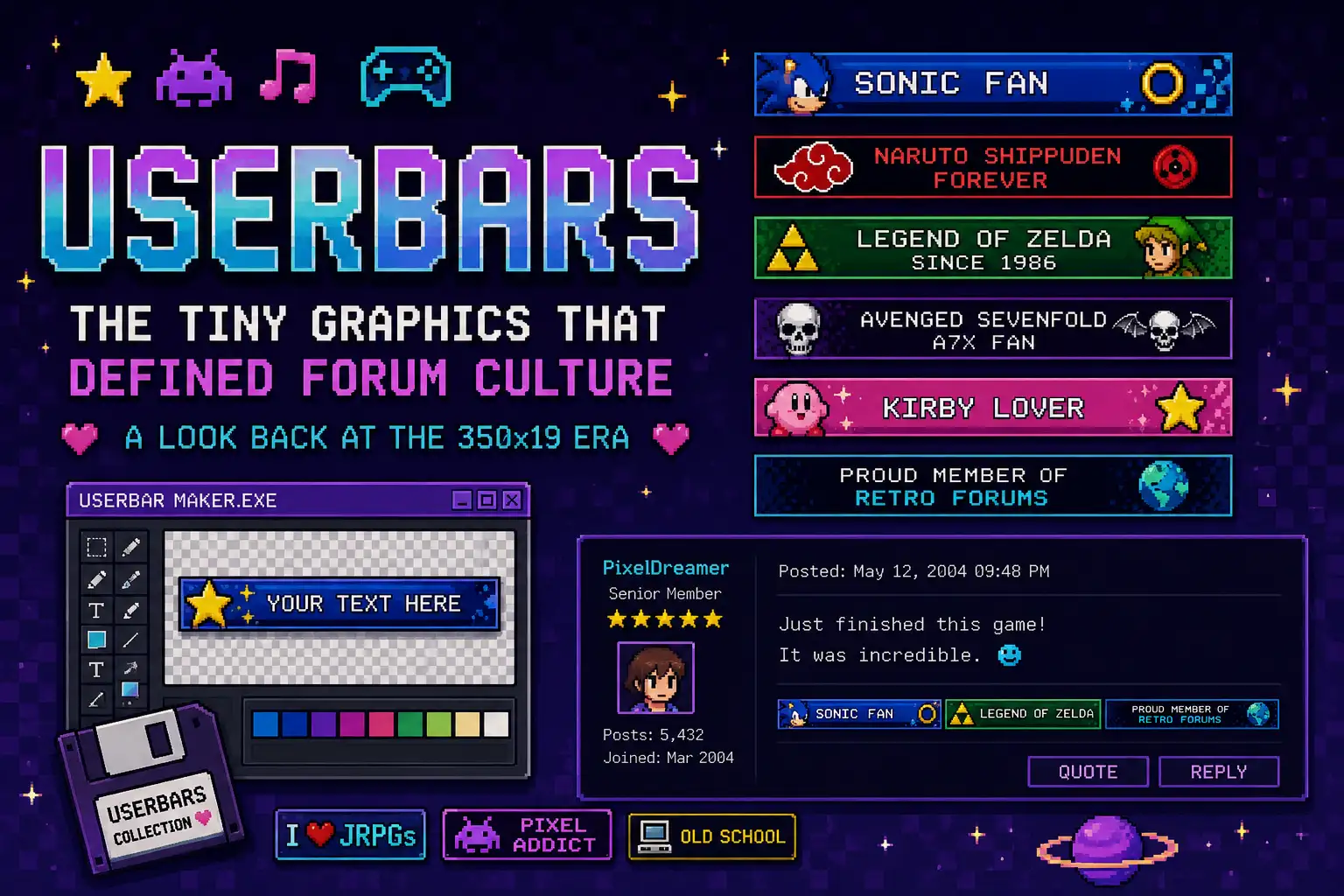
Userbars were small rectangular graphics that forum members added to their websites to show a fandom, hobby, interest, or part of their identity. This usually came in 350×19 pixels, combined with a small image and short, bold, pixel-style text inside a thin border.
People collected them, traded them, and displayed them beneath their posts. A plain forum signature became a sensation visual summary of everything someone cared about.
In the early and mid-2000s, forum culture featured image-enabled signatures that gave users a chance to give an online presence. Before tech giants offered profile badges and visual identity tools, old forum userbars provided a simple way to show what communities, games, or fandoms someone belongs to.
Table of Contents
Where the Userbars Format Came From
When creators give an option to allow images inside signatures, it becomes a display of graphics representing their interests. With the increase in these graphics, userbars became more than simple decorations. Members are allowed to create custom designs, share finished graphics, and build collections around specific subjects.
This was part of a history of websites. In the same era, trends like blinkies, fanlisting pages, personal galleries, webrings, and other small forms of online self-expression. Most of the personal websites were built around exactly this idea: take a small piece of the web and make it feel yours completely.
Then dedicated userbar archives eventually appeared, where people can access, collect and browse the graphics. Sites like USERBARS.org work like a specialized web directories, but instead of listing websites, they organized small graphics by category such as music, games, movies, technology, and sports.

The 350×19 Format
The 350×19 userbar format is the most used userbar size. When I researched this, the MelonLand Forum once used 350×20 instead of the traditional size. The dimensions of the Userbar are crucial because it needs to fit comfortably inside a forum signature.
Typography was another recognizable feature. Most of the visitors use the TT1 BRK pixel-style font, often around size 10px, according to the Wikitionary’s userbar entry.
A typical design combined:
- A small image or logo
- Short text
- Pixel-style typography
- A gradient or textured background
- A thin border
- Sometimes a glow or animated effect
What Old Userbars Represented
Old forum userbars could represent almost anything that mattered to the person who used them. Gaming fans displayed favorite games. Anime fans used characters and series. Music fans represented their best bands and albums, just like in sports fans.
- Favorite movies and TV shows
- Technology and computers
- Online communities
- Hobbies
- Personal interests
- Fandoms
- Forum memberships
The real goal wasn’t to create sophisticated artwork to show others. A userbar was designed to communicate something quickly.
That simplicity was part of the charm of the period. Much like other creative websites and unique websites, in those years, personal expression is rather than polished commercial design.
How People Made Them
At the time, Photoshop was a popular tool for creating userbars, but it wasn’t essential. GIMP and other image editors could also do the same process, while online generators like the one on Webestools made the format accessible to people without design software.
The basic workflow was straightforward:
- Create a small canvas.
- Add an image or background.
- Choose a short phrase.
- Add pixel-style text.
- Apply borders, gradients, or effects.
- Save the image and add it to a forum signature.
Prebuilt templates and shared resources made it easier for beginners to create their own graphics. People can experiment with colors, images, fonts, and effects without needing any professional design skills.
This reminds you don’t need any professional platforms to create something personal. A basic image editor and a forum account could be enough.
The Signature Space Problem
Because userbars forum signatures had to fit beneath forum posts, the saved userbars became a problem for collectors. One userbar was small. Several could turn a signature into a large stack of images.
While some members kept their collections short, Others combined several graphics into one image or experimented with animated GIFs to fit more personality in the same space.
People who wanted to display larger collections could move them to a personal homepage or gallery. This builds a connection with forum culture and the world of personal websites.
The signature became a tiny personal gallery attached to every post.
Userbars vs. Userboxes
| Userbars | Userboxes |
|---|---|
| Mostly used in forum signatures. | Mostly used on wiki user pages. |
| Usually long, horizontal graphics. | Usually small, box-shaped graphics. |
| Showed things you liked, such as games, bands, anime, or fandoms. | Shared details about you, such as interests, languages, skills, or opinions. |
| Appeared below your forum posts. | Appeared on your personal wiki page. |
| Felt like a small badge showing what you were into. | Felt more like a quick profile card about you. |
| Part of the old forum culture. | Closely tied to wiki communities. |
Why Userbars Faded
It’s not fully disappeared, but the popularity of userbars was closely tied to the era of forums. When social media introduced profile systems, signatures became less important as a place for displaying identity. Don’t think it only affect on userbars, the changes affected many other parts of the old web too.
Shoutbox became less common. Visitor counters on the web disappeared from many pages. Guestbooks became harder to find. Personal pages were increasingly replaced by hosted profiles and social feeds. Unfortunately, userbars followed the same pattern.
Still, the format survives in small communities and some retro websites. Modern independent forums and retro-styled web projects occasionally recreate the same visual language; this keeps the tradition alive in a small corner of the internet.
Why Userbars Still Feel Special
First of all, userbars were only one small part of a much larger ecosystem. The web of the 1990s and early 2000s was filled with personal pages, fan sites, forums, web directories, and internet directories that helped the people to find the communities and interests, including many of the interesting websites still talked about today.
Userbars brought that same desire for customization into forums.
Instead of designing the whole homepage, users could personalize the small space beneath every post. Their signature became another piece of personal web space. They weren’t a major technology, but they reveal how ordinary users changed the shaping of online culture.
The Lasting Appeal
he visual style of old forum userbars may look simple today, but userbars gave people a small space to make their corner of the internet feel like their own.
A userbar gave them a tiny canvas to express that identity. Maybe it’s their favorite game, a band, a fictional character, a hobby, or an entire community.
The format didn’t need sophisticated technology. It only need a small image, a few words, and display on the forum section.
That’s what makes userbars worth remembering. They were never a major thing in web technology or a revolutionary publishing format. They are a tiny piece of internet culture that helped people personalize the places where they spent their time. And sometimes those tiny details are exactly what make the history of websites worth exploring.

Asif BC is a web developer with 2 years of professional experience in website development and modern web technologies. As the creator of Curiouxify, he researches and writes about interactive websites, internet history, browser experiments, digital culture, and the evolution of the web. His articles combine technical knowledge with careful research to document the creative and lesser-known corners of the internet.